The h1 element is used to indicate the most important (or highest-level) heading on the page.
In total, we have six heading levels to choose from—h1 to h6—to add structure to the web page. h1 is the highest heading level (and, by default, the largest in terms of font size) and h6 the lowest (and smallest).
A document’s first heading should be an h1, followed by one or more h2 headings; each of these h2 headings can then have a further series of h3 headings below them, and so on, right on down to heading level 6. The HTML 4 spec states that heading levels should not be skipped (that is, you shouldn’t have a series of headings in the order h1, h2, h2, h4, which skips the h3 entirely), although it isn’t always possible to guarantee such rigidity in the markup, particularly if your pages are generated by a CMS. However, this goal is certainly one for which you should aim.
Headings add semantic richness to a document, which can help with search engines’ understanding of the makeup of that document, and provide users of assistive devices (such as screen readers) with an additional—and quick—method by which to navigate through a document: they can skip from heading to heading.
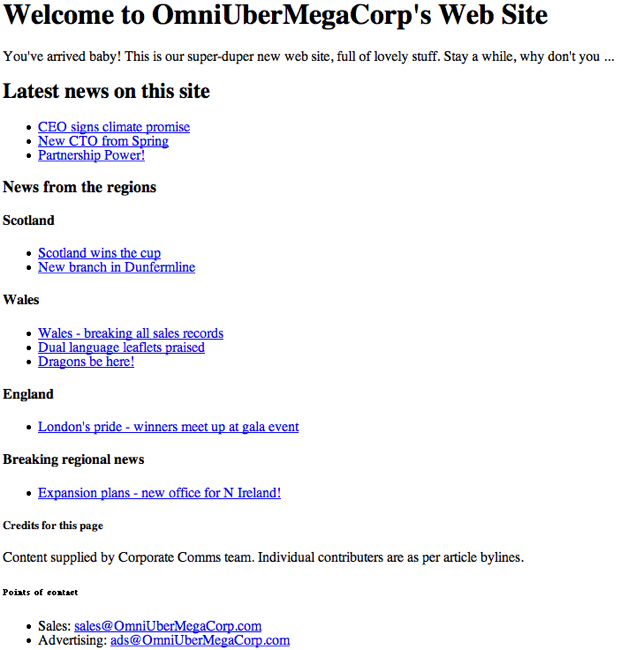
Figure 1 shows a comparison of the six heading levels in a fictional web site, as rendered by Firefox’s default browser style sheet.
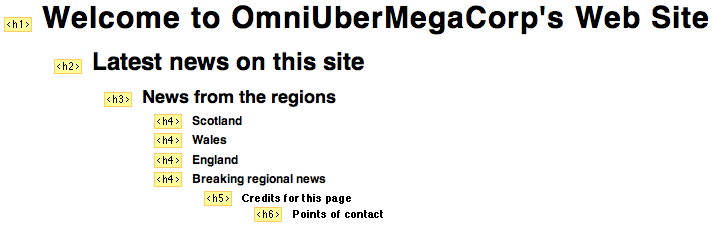
 The document outline, showing the heading levels, is clear to see using Firefox’s Web Developer extension (via that tool’s Information > View Document Outline command), as shown in Figure 2.
Example
This h1 element
is used to present a fluffy welcome message:
<h1>Welcome to OmniUberMegaCorp's Web Site</h1>
Use This For …
This element may contain any text content, but it can’t include any block-level elements: only inline or phrase elements can be included.Frequently Asked Questions (FAQs) about H1 HTML Element
What is the significance of the H1 HTML element in SEO?
The H1 HTML element plays a crucial role in Search Engine Optimization (SEO). It is the first header that search engines use to determine what the content on a webpage is about. This means that an effective H1 tag can significantly improve your website’s visibility on search engines. It’s important to include relevant keywords in your H1 tags to help search engines understand your content better.
Can I use multiple H1 tags on a single webpage?
While it’s technically possible to use multiple H1 tags on a single webpage, it’s generally not recommended. Having multiple H1 tags can confuse search engines about the main topic of your page. It’s best to use one H1 tag for the main title, and then use H2, H3, etc., for subheadings.
How should I style my H1 tags for better readability?
Styling your H1 tags can greatly enhance the readability of your content. You can use CSS to adjust the font size, color, and style of your H1 tags. However, it’s important to ensure that your H1 tags stand out from the rest of your content, as they serve as the main title of your page.
What is the difference between H1 and other heading tags?
The main difference between H1 and other heading tags (H2, H3, etc.) is their level of importance. H1 is considered the most important heading tag, as it provides the main title of a webpage. The other heading tags are used for subheadings, with their importance decreasing as the number increases (H2 is less important than H1, H3 is less important than H2, and so on).
How does the H1 tag affect the structure of my webpage?
The H1 tag plays a key role in structuring your webpage. It serves as the main title of your page and provides a clear hierarchy for your content. This not only helps search engines understand the structure of your page, but also improves the user experience by making your content easier to navigate.
Can I use special characters in my H1 tags?
Yes, you can use special characters in your H1 tags. However, it’s important to ensure that these characters are properly encoded to avoid any issues with how your tags are displayed.
What happens if I don’t use an H1 tag on my webpage?
If you don’t use an H1 tag on your webpage, search engines may have a harder time understanding what your content is about. This could potentially affect your website’s visibility on search engine results pages. Additionally, not using an H1 tag could negatively impact the user experience, as it provides a clear title for your content.
Can I use images or links in my H1 tags?
While it’s technically possible to include images or links in your H1 tags, it’s generally not recommended. This is because search engines primarily use H1 tags to understand the text content of your page. Including images or links could potentially confuse search engines and negatively impact your SEO.
How does the H1 tag relate to the title tag?
The H1 tag and the title tag serve different purposes. The title tag is used to provide a title for your webpage that is displayed on search engine results pages, while the H1 tag provides the main title for your content that is displayed on the webpage itself. While both tags should be relevant to your content, they don’t necessarily need to be identical.
Can I use CSS to hide my H1 tag?
While you can use CSS to hide your H1 tag, it’s generally not recommended. This is because hiding your H1 tag could potentially be seen as deceptive by search engines and could negatively impact your SEO. It’s best to use your H1 tag to provide a clear, visible title for your content.
 Adam Roberts
Adam is SitePoint's head of newsletters, who mainly writes Versioning, a daily newsletter covering everything new and interesting in the world of web development. He has a beard and will talk to you about beer and Star Wars, if you let him.