CSS Selectors: Attribute Selectors

Key Takeaways
- Attribute selectors in CSS match elements based on their attributes, which can be an attribute alone or an attribute and value combination. Examples include [type], [type=checkbox] or [for=”email”].
- Attribute selectors can also be used to match attribute presence and substring matching. For instance, they can match attribute values in a space-separated list, start with a specific string like ‘tel:’, or match hyphenated attribute values such as ‘en-US’.
- The hyphenated attribute value selector is particularly useful for styling differences in language. However, for other usages, it might be safer to use a class name selector due to the lower risk of unintended effects in large projects.
- CSS attribute selectors can also select elements when the attribute values match a particular substring. This is useful for styling links that behave differently from other hyperlinks, like those using ‘tel:’ or ‘mailto:’.
Attribute selectors are CSS selectors that match elements based on their attributes. This can be an attribute alone, such as [type], or it can be an attribute and value combination, such as [type=checkbox] or [for="email"].
We can also do attribute presence and substring matching with attribute selectors. For example, we can match attribute values in a space-separated list, or we can match attribute values that start with tel:. We can even match hyphenated attribute values such as en-US.
Some of the attribute selectors we’ll cover here are old hat. Both the hyphenated attribute value selector and the space-separated attribute value selector were defined in CSS2. Selectors Level 3, on the other hand, adds a few powerful selectors that let us match partial attribute values.
We’ll focus on the new and lesser-known attribute selectors in this section. Let’s take a look.
Matching Attribute Presence
It’s common to match elements based on the exact value of their attributes. Reset style sheets commonly use selectors selector such as [type=text] and [type=email]. But we can also match attributes when there are multiple space-separated values. We need to use our space-separated attribute value selector: [att~=val].
The space-separated attribute value selector matches elements with the attribute att and a list of values, one of which is val. This can be any attribute that accepts space-separated values, including class or data-*.
Space-separated lists of attributes are admittedly uncommon. They are sometimes used with the rel attribute and microformats to describe relationships between people and documents. We might mark up an external link like so:
<a href="http://example.com/" rel="external friend">Bob</a>We can then use this presence-based attribute selector to match this link and links like it:
[rel~=friend] {
font-size: 2em;
background: #eee;
padding: 4px;
text-decoration: none;
border-bottom: 3px solid #ccc;
}
[rel~=friend]:link,
[rel~=friend]:visited {
color: #34444C;
}
[rel~=friend]:hover{
background: #ffeb3b;
border-color: #ffc107;
}
This gives us the image in the figure below.

Matching Hyphenated Attribute Values
One of the more interesting tasks we can do with attribute selectors is match elements with hyphenated attribute values by using [attr|=val]. This selector matches elements by attribute when its value is hyphenated and its prefix equals val.
At first glance, this may seem like a useless selector; however, it’s quite practical for working with languages and language codes—such as en-US or es-MX—which is its intended use.
Let’s say we have a site targeting English speakers. Our site also supports two regional variations in English: United Kingdom and United States. The language codes for these languages are en-GB and en-US respectively. We’ve also set the language on our html tag; for example, <html lang="en-US">.
Our site teaches English speakers to be conversant in French, Spanish, and Portuguese. It contains lots of markup similar to this example:
<p lang="fr-FR"><q>Tout le monde.</q></p>
<p><q>All the world.</q>, or <q>Everyone</q></p>
Let’s italicize our French text and add language-appropriate angle quotes (« and ») to either side of it:
[lang|="fr"] {
font-style: italic;
}
[lang|="fr"] q:before{
content: '\00AB'; /* Left angle quote */
}
[lang|="fr"] q:after{
content: '\00BB'; /* Right angle quote */
}
What’s cool about this selector is that it will also match if the attribute equals the prefix. These styles would also apply to <p lang="fr">. We could further limit the scope of these selectors, for example, by adding a p element to the lang attribute: p[lang|="fr"].
Though intended to be used with language codes, this selector isn’t limited to them. We can use it with any hyphenated attribute value. Consider the following markup:
<article class="articlepromo">
<h3>U.S. ratifies Kyoto Protocol</h3>
<p>Lorem ipsum dolor sit amet, consectetur adipisicing ....</p>
</article>
<article class="articlepromo-entertainment">
<h3>Kardashian-Wests welcome South to the world</h3>
<p>Lorem ipsum dolor sit amet, consectetur adipisicing ....</p>
</article>
<article class="articlepromo-sports">
<h3>New York Knicks win NBA title</h3>
<p>Lorem ipsum dolor sit amet, consectetur adipisicing ....</p>
</article>
<article class="articlepromo-business">
<h3>Google Buys EverythingOnTheInternet.com</h3>
<p>Lorem ipsum dolor sit amet, consectetur adipisicing ....</p>
</article>
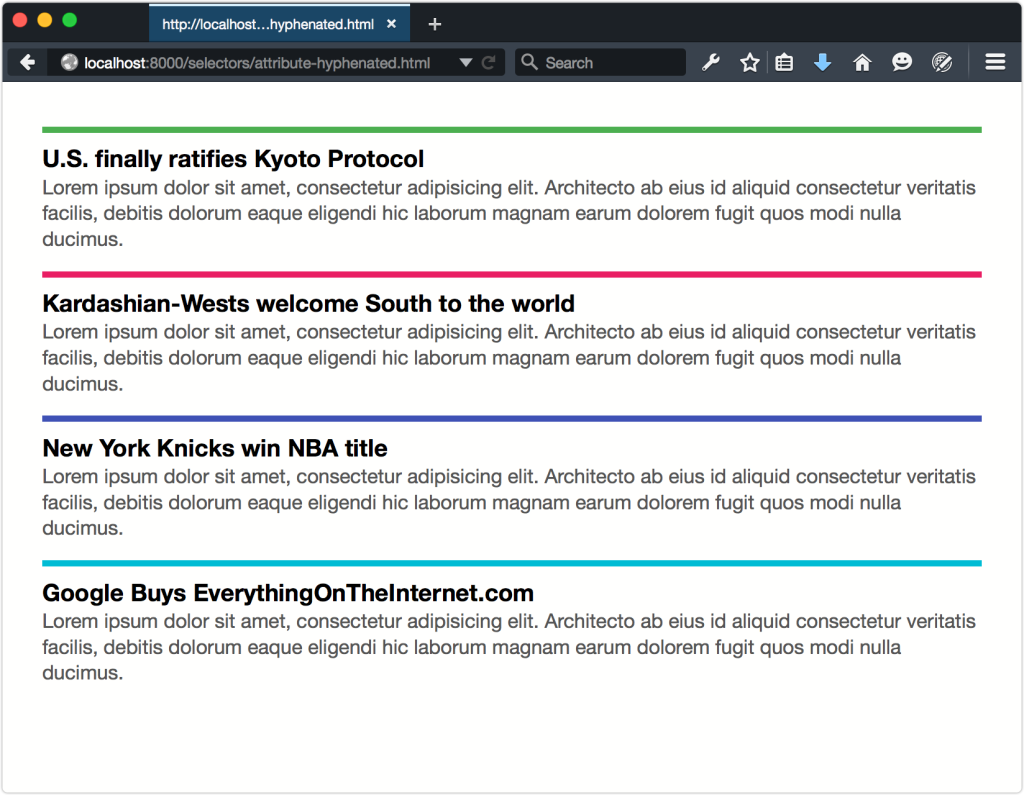
These are all article promos or teasers. They share some of the same visual characteristics and behavior, along with an articlepromo prefix. Here, too, we can use the hyphenated attribute selector to match these class names:
[class|="articlepromo"] {
border-top: 5px solid #4caf50;
color: #555;
line-height: 1.3;
padding-top: .5em;
}
[class|="articlepromo"] h3 {
color: #000;
font-size: 1.2em;
margin:0;
}
[class|="articlepromo"] p {
margin: 0 0 1em;
}
Follow this up with specific border colors for each section type, and you’ll achieve something along the lines of the layout you see in the figure below.
We can also use it with id names; for example, [id|=global] would match #global-footer, #global-menu, and so on.
Now, just because you can do something doesn’t necessarily mean you should. The hyphenated attribute value selector is ideal for styling differences in language. For any other usage, though, you’d do just as well to use a class name selector. Class names provide a lower risk of unintended effects in a large project. They’re also a must if your project still requires Internet Explorer 8 support, since IE8 does not support this selector.
Matching Attribute Values by Substring
We can also select elements when the attribute values match a particular substring. Three character sequences let us match elements depending on whether this substring sits at the beginning, end, or elsewhere in the attribute value:
^=- matches when the substring sits at the beginning of the string.
$=- matches when the substring sits at the end of the string.
*=- matches when the substring is present at any position within the string.
When might these selectors come in handy? Think about links using tel: (non-standard) or mailto:. Since they behave differently from other hyperlinks, it makes sense to style them differently just as a hint to the user. Take the Call this business link:
<a href="tel:+14045555555">Call this business</a>We can select this and other tel: links by using the ^= character sequence: [href^="tel:"]. Let’s add some declarations:
[href^="tel:"] {
background: #2196f3 url(../images/phone-icon.svg) 10px center / 20px auto no-repeat;
border-radius: 100px;
padding: .5em 1em .5em 2em;
}
You can see the result in the figure below.

To match elements when the attribute value ends with a substring, change ^ to $. If, for some odd reason―and let me emphasize that it would be odd―we wanted to match the last four digits of our phone number (5555), we might use the following:
[href$="5555"] {
background: #e91e63;
}
It’s more useful, obviously, to match elements that end with the same suffix. For example, you could match both <aside class="sports-sidebar"> and <aside class="arts-sidebar"> with [class$=sidebar].
Using $= won’t, however, match an element with the class name sports-sidebar-a. For that we’d need to use the *= sequence. Changing our selector to [class*=sidebar] does the job.
Most of the new selectors added in CSS3 and CSS4 are not attribute selectors at all. They’re pseudo-classes or pseudo-elements. We’ll discuss these over the next few sections.
Frequently Asked Questions (FAQs) on CSS Attribute Selectors
What are the different types of CSS attribute selectors?
CSS attribute selectors are a powerful tool that allows you to select elements based on their attributes and attribute values. There are five main types of attribute selectors:
1. [attr]: This selector matches elements with an attribute named “attr”.
2. [attr=value]: This selector matches elements with an attribute named “attr” and whose value is exactly “value”.
3. [attr~=value]: This selector matches elements with an attribute named “attr” and whose value is a whitespace-separated list of words, one of which is exactly “value”.
4. [attr|=value]: This selector matches elements with an attribute named “attr” and whose value is either exactly “value” or begins with “value” immediately followed by a hyphen (-).
5. [attr^=value], [attr$=value], [attr*=value]: These selectors match elements with an attribute named “attr” and whose value begins (^=), ends ($=), or contains (*=) the substring “value”.
How can I use CSS attribute selectors to style elements?
CSS attribute selectors can be used to style elements in a variety of ways. For example, you can use the [attr=value] selector to style all elements with a specific attribute value. Here’s an example:input[type="text"] {
background-color: yellow;}
In this example, all text input fields will have a yellow background color.
Can I combine multiple CSS attribute selectors?
Yes, you can combine multiple CSS attribute selectors to target elements more specifically. For example, you can select an element that has both a type attribute with the value “text” and a required attribute:input[type="text"][required] {
border: 1px solid red;}
In this example, all required text input fields will have a red border.
Are CSS attribute selectors case-sensitive?
By default, CSS attribute selectors are case-sensitive. However, you can make them case-insensitive by adding an ‘i’ before the closing bracket. For example, [attr=value i] will match elements with the attribute ‘attr’ whose value is ‘value’, regardless of case.
Can I use CSS attribute selectors with pseudo-classes?
Yes, you can use CSS attribute selectors with pseudo-classes. For example, you can select all input fields of type “text” that are currently in focus:input[type="text"]:focus {
background-color: lightblue;}
In this example, the background color of text input fields will change to light blue when they are in focus.
How does the performance of CSS attribute selectors compare to other selectors?
CSS attribute selectors are generally slower than other selectors, such as class and ID selectors. However, the difference in performance is usually negligible unless you’re working with a very large DOM. It’s best to use attribute selectors when they make your code more readable and maintainable.
Can I use CSS attribute selectors to select elements based on their data attributes?
Yes, you can use CSS attribute selectors to select elements based on their data attributes. For example, you can select all elements with a data-toggle attribute:[data-toggle] {
cursor: pointer;}
In this example, all elements with a data-toggle attribute will have a pointer cursor.
Can I use CSS attribute selectors to select SVG elements?
Yes, you can use CSS attribute selectors to select SVG elements. For example, you can select all SVG elements with a fill attribute:svg[fill] {
stroke: black;}
In this example, all SVG elements with a fill attribute will have a black stroke.
Can I use CSS attribute selectors to select elements based on their aria attributes?
Yes, you can use CSS attribute selectors to select elements based on their aria attributes. For example, you can select all elements with an aria-hidden attribute:[aria-hidden="true"] {
display: none;}
In this example, all elements with an aria-hidden attribute of “true” will be hidden.
Can I use CSS attribute selectors to select elements based on their custom attributes?
Yes, you can use CSS attribute selectors to select elements based on their custom attributes. For example, you can select all elements with a custom attribute named “my-attr”:[my-attr] {
color: blue;}
In this example, all elements with a custom attribute named “my-attr” will have blue text.
Tiffany B. Brown is a freelance web developer and technical writer based in Los Angeles. Brown offers web development and consulting services to larger agencies and small businesses. A former member of the Opera Software developer relations team, Brown is also co-author of SitePoint's JumpStart HTML5 book. She sporadically writes about web development technology on her blog. You can follow her on Twitter at @webinista.